GodotSteamKit 
Introduction
A collection of extra tools for GodotSteam. The Kit contains a series of custom nodes, starter kits, autoload scripts, themes, and more all meant to help speed up and streamline working with various parts of Valve's Steamworks SDK.
It comes in two flavors: free piecemeal versions of each component or a paid all-in-one plug-in version with some extra features.
Piecemeal Components
All of the individual components are free to download and can be combined with other components. The starter kits may require the custom nodes and autoload scripts to function out-of-the-box or can be modified to work without them.
Full All-In-One Kit
This paid all-in-one kit is available as a Godot plug-in and contains all of the components of the GodotSteamKit including some extras. It will receive new features before they get released as components. It also helps fund future development of both the GodotSteamKit and main GodotSteam project.
You can purchase it directly on Ko-Fi or use the one-time tier on Github Sponsors; Github Sponsors purchases will get you a code for Ko-Fi. Also, reoccuring sponsors and buyers get access to the Kit through Codeberg!
Autoloads 
Currently the Kit contains the following autoloads:
Steamworks.gd
This script contains the bulk of the initialzation functionality and data collection. It has signals for initialization failure as well and, currently, a hook for Steam hardware querying. This script is automatically added to your autoloads in the Project Settings when the plug-in is enabled (only for the all-in-one version).
SteamHardware.gd
This script contains functionality and properties for querying and dealing with Steam hardware, such as the Steam Deck, Steam Machine, Steam Frame... or the lack thereof.
Custom Nodes 
Currently the Kit contains the following custom nodes:
Steam Achievement Icons
Comes in three different variants: SteamAchievementIcon, SteamAchievementIcon3D, and SteamAchievementIconRect, which are based on Sprite2D, Sprite3D, and TextureRect respectively.
You can apply the achievement_api_name that was set in the Steamworks back-end to fetch and display the achievement's icon texture.
For more information on how to use the Steam Achievement Icon nodes, please check out this tutorial.
Steam Avatars
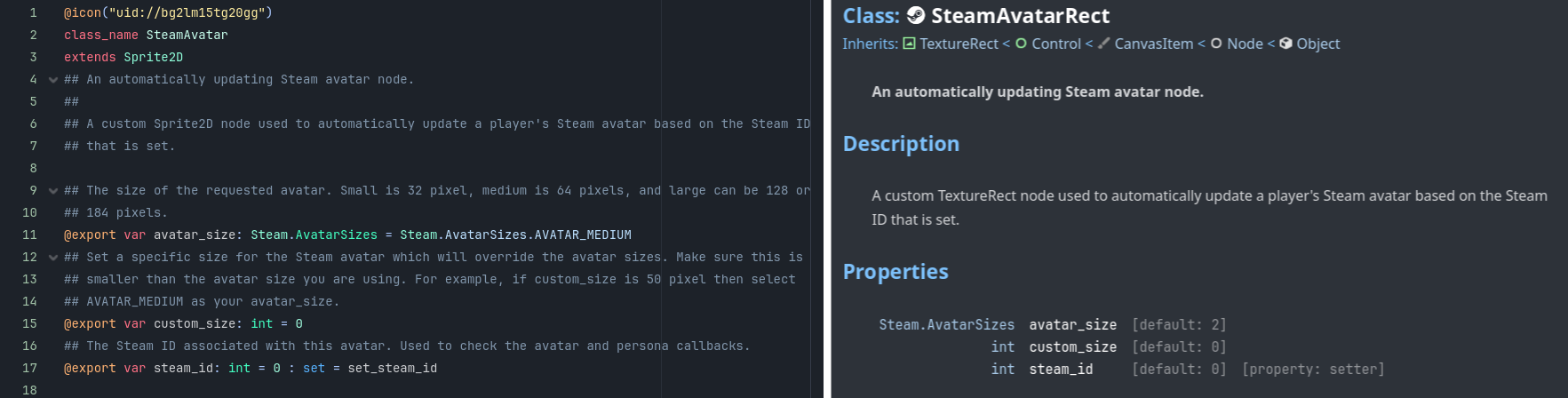
Comes in three different variants: SteamAvatar, SteamAvatar3D, and SteamAvatarRect, which are based on Sprite2D, Sprite3D, and TextureRect respectively.
You can apply the steam_id of the player to track and these custom nodes will automatically update their texture to the current Steam avatar. If the player changes their avatar at any point, the node will recognize the persona_state_change callback from Steam and update itself accordingly.
For more information on how to use the Steam Avatar nodes, please check out this tutorial.
Steam Usernames
Comes in two variants: SteamUsername and SteamUsername3D, which are based on Label2D and Label3D respectively.
You can apply the steam_id of the player to track and these custom nodes which will automatically request the username of the given player and display it. If the player changes their username at any point, the label will recognize the persona_state_change callback from Steam and update itself accordingly.
For more information on how to use the Steam Usernames nodes, please check out this tutorial.
Steam Voice
This custom node provides all the logic to implementing Steam Voice chat in your game. Just hook up some buttons or input actions to interact with it, a network call to process the data, and you are ready to go.
For more information on how to use the Steam Voice node, please check out this tutorial.
Starter Kits 
Designed to help jump-start some of the more cumbersome parts of working with Steam, these starter kits can be mixed, torn apart, and redesigned to fit your project.
Steam Chat
This custom scene can be used anywhere you want to have Steam-based chat, though it was primarily built to use along with the Steam Lobbies custom node. It handles basic kicking commands sent through chat and has a planned Steam Voice addition soon to support in-game audio chat. Other than visual style and layout changes, this scene is ready to go out-of-the-box.
For more information on how to use the Steam Chat scene, please check out this tutorial.
Steam Leaderboards
This custom leaderboards scene handles displaying leaderboards and related image UGC; it also comes with an uploading script. It comes with two child scenes: Leaderboard Entry and Leaderboard UGC which, as their names imply, are used to handle each component.
For more information on how to use the Steam Leaderboards scene, please check out this tutorial.
Steam Lobbies
The lobbies starter kit comes with a host scene for setting up lobbies, a join scene for viewing and filtering Steam lobby lists, and the main lobby scene itself for when the player has joined a lobby. There is also an extra lobby manager scene to swapping between these three scenes but it totally optional and more of an example than anything.
For more information on how to use the Steam Lobbies scene, please check out this tutorial.
Additional Documentation 
Each custom scene and custom node should have documentation in the editor; the scripts themselves containing a lot of commenting on how things work. Or, as mentioned above, there are tutorials for each component in the Kit.
Planned Roadmap 
There are quite a few more bits and pieces planned for future updates to the Kit including more starter kits, custom nodes, and more. Let's check out some of those things.
Custom Nodes
Future custom nodes include SteamInputController for streamlining interactions.
Starter Kits
The next batch of starter kits include Steam Networking, Steam Remote Play, and Steam Input for speeding up work with these somewhat cumbersome features.
Other Tools
The first wave of additional tools include Steam Uploader for publishing your builds to Steam more easily and VDF Editor for editing your SteamPipe or Input files from the editor.
Godot Compatibility 
GodotSteamKit is primarily written for Godot 4.x but could be altered to work with Godot 3.x too. Obviously, it depends heavily on GodotSteam and will work with either the precompiled editor or the GDExtension version.
License 
GodotSteamKit is covered by a custom GSSL (GodotSteam Software License) license. In short:
- you may use the Kit in any free or commerical games or software
- you may use the Kit without attribution to Gramps or GodotSteam but keep the license in your project somewhere
- you may not distribute, repackage, and/or sell the Kit, in whole or part, anywhere